1. Lab Assignment 3 Cache Lab
You are to implement the L1 cache, in a simulated environment. The L1 cache receives requests from the CPU and fulfills them.
Your implementation consists in four functions (you can add more as you see fit):
void l1_init (size_t s, size_t E, size_t b, cache_policy_t policy);
void l1_destroy ();
void l1_get_stats (cache_stats_t* stats);
void l1_request (mem_request_t* req);
The first two functions initialize and free the memory for your L1 cache, the third just gathers some stats about your cache (number of hits, misses, and evictions), and the last one is the main function of your lab, fulfilling the requests.
Since we are concerned with evictions, we will look at different eviction policies, that is, how the cache makes some room in a full set. You will implement 4 different policies.
In the bonus part of this lab, you will optimize an array-based algorithm to minimize the number of cache misses. Your points are proportional to the cache performances of your program.
2. Downloading the assignment
Start by accepting the GitHub Assignment by clicking on the invitation link from the assignment description on D2L. Then clone your repository in your home directory on the matrix.cdm.depaul.edu machine:
$ cd ~/
$ git clone git@github.com:transcendental-software/csc-374-lab3-USER.git
This will cause a number of files to be unpacked into the directory. You should only modify the files src/l1cache.c and src/strides.c, and these are the only files that are submitted. The tests folder contains the different tests and grading examples for your program. Use the make command to compile your code and the command make test to run the test driver. This would run all the tests for all parts, which is not really useful while working; see Section Driver for more finely grained testing options.
3. Behavior of the cache simulator
Your L1 cache is being called from a program with the following usage:
$ ./cachesim -h
Usage: ./cachesim [-hv] -s <num> -E <num> -b <num> -p <policy> -t <file> -m <file>
Options:
  -h          Print this help message.
  -s <num>    Number of set index bits.
  -E <num>    Number of lines per set.
  -b <num>    Number of block offset bits.
  -p <policy> Replacement policy: low, hig, lru, lfu.
  -t <file>   Trace file.
  -m <file>   Memory file.
The s, E, b, options correspond to the parameters of your cache; respectively, the number of bits for the set index, the number of lines, and the number of bits for the byte offset. The p option corresponds to the eviction policy (more on this later). These options will be passed to your implementation via the l1_init function.
The t and m options indicate, respectively, a file that contains the sequence of memory accesses and the memory map as it was at the beginning of the program. Your code will not receive these files, but direct requests using your l1_request function. The trace file contains lines of the shape:
[M] EXEC_ID: 91667 INS_ADDRESS: 000000000400a7cc START_ADDRESS: 000000000487e310 LENGTH: 8 MODE: R DATA: 4004880400000000
They indicate which instruction triggered that memory access (here, the instruction at address 400a7cc), the memory location that was accessed (here, 487e310), the number of bytes accessed (here, 8), what was done (here, a read), and what were the data that were read.
The length can vary between 1 and 128, but you are guaranteed that:
- The access is aligned (i.e., the address accessed is a multiple of the length),
- The access fits in a cache line (i.e., the length bytes at address all fall in the same cache line).
The cache simulator will just make requests to your cache through the function l1_request, so you will not have access to the trace file.
Note: The traces and memory maps that you receive correspond to actual programs. They were extracted using tracergrind, a Valgrind tool that gives a complete memory trace of a program:
$ valgrind --tool=tracergrind --output=ls.trace ls
$ texttrace ls.trace ls.txt
$ cat ls.txt
[...]
[M] EXEC_ID: 1 INS_ADDRESS: 0000000004001e24 START_ADDRESS: 0000001ffefff9a0 LENGTH: 8 MODE: W DATA: 0000000000000000
...
The memory map was then reconstructed from all the read requests to addresses that were not previously written to.
Note: As we've seen, locality implies that a well-behaved program will reuse addresses or use addresses close by, resulting in more hits than misses. However, data and instructions are usually located at different memory locations and it is undesirable that a data access would evict a line of instructions. Moreover, memory for instructions is usually read-only, so there's no need for the cache to implement writing and cache consistency (i.e., making sure the cached data has not be overwritten in another cache).
We will see in Ch. 9, Lec. 9, that modern CPUs have separate lower-level caches (L1) for instructions and data. Higher-level caches (L2, L3) don't make the distinction. Since we don't distinguish between instructions and data, we can consider that we are simulating a L2 cache.
4. Parts 1-4: Cache Simulator (200pts)
4.1. Functions and Types
Your cache is initialized with a few parameters:
- The values of
s,E, andbas in the lectures. This means that you should simulate a cache with2^ssets, each withElines, and each line contains2^bbytes from the memory. - An eviction policy.
The eviction policy is a small integer, of type:
typedef enum {
  CACHE_LOW = 0,
  CACHE_HIG,
  CACHE_LRU,
  CACHE_LFU,
} cache_policy_t;
Before making any request, the following function is called to initialize your cache:
void l1_init (size_t s, size_t E, size_t b, cache_policy_t policy);
Requests are implemented using the type:
typedef struct {
    bool        is_read;
    char        data[MAX_CACHELINE_SIZE];
    uintptr_t   address;
    size_t      len;
} mem_request_t;
The request indicates whether it is a READ request (is_read == true) — in which case the cache should put the data at addresses address to (address+len - 1) in data — or a WRITE request (is_read == false) — in which case data[0] to data[len - 1] should be written at address, in the L1 cache. The request should not be forwarded to the L2 cache (which would be a "write-through"); instead, we will commit the line to the L2 cache on eviction only ("write-back").
The L1 cache can send requests to the L2 cache using:
void l2_request (mem_request_t* req);
There are two types of L2 requests you will want to make:
-
Read requests; this is when you do not have the data and need to request it from the L2 cache. You must query a full L1 line each time, with the byte offset zeroed out.
mem_request_t myrequest; myrequest.is_read = true; myrequest.address = address & (~0 << b); // zeroes out the last b bytes of address myrequest.len = B; l2_request (&myrequest); // the data is now in myrequest.data[0] to myrequest.data[B - 1]. -
Write requests; this is exclusively when you evict a line. You must write a full L1 line. You must write a line on eviction.
mem_request_t myrequest;

myrequest.is_read = false;
myrequest.address = address & (~0 << b); // zeroes out the last b bytes of address
myrequest.len = B;
memcpy (myrequest.data, data_to_write, B);
l2_request (&myrequest);
At the end of the simulation, the following function is called to free the memory associated with your cache.
void l1_destroy ();
Finally, the simulator will retrieve the hits/misses/evictions count using:
typedef struct {
    size_t hits, misses, evictions;
} cache_stats_t;

void l1_get_stats (cache_stats_t* stats);
Note: Cache organization is detailed in Ch. 6, Lec. 4, an important slide being:
Your implementation will reflect this, except for the fact that no bytes will be actually cached; we only keep the information on whether an address is cached or not.
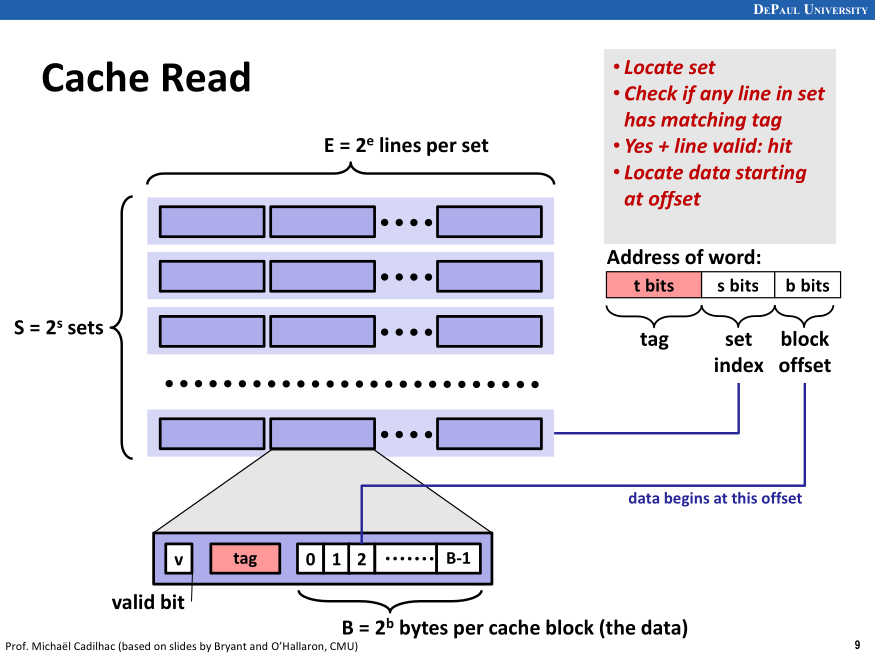
4.2. Main algorithm
The strategy follows what we have seen in class. To wit:
- Extract the tag
tag, set indexsi, and block offsetbofromreq->address. - For each line in the set
si:- If the line is valid and has the correct tag, then it's a hit.
- If
req->is_readis true, then we overwritereq->datawithreq->lenbytes taken from the line, starting with thebo-th byte of the line. - If
req->is_readis false, then we overwritereq->lenbytes from the line, starting with thebo-th byte, with the data inreq->data.
- If
- If the line is valid and has the correct tag, then it's a hit.
- If no line was found, it's a miss.
- Select a line to put the data from L2 cache in:
- If there is an invalid line, pick it.
- Otherwise, select a line for eviction according to the policy. Write-back that line to the L2 cache.
- Request a full line of data from the L2 cache that corresponds to our request, and write it in our line.
- Proceed as with hit (read/write).
- Select a line to put the data from L2 cache in:
4.3. Part 1: LOW Policy (30pts)
The LOW policy favors eviction of lines with lowest address. Since eviction takes place in a given set, this simply means that the line with lowest tag will get evicted.
4.4. Part 2: HIG Policy (50pts)
The HIG policy favors eviction of lines with highest address. Since eviction takes place in a given set, this simply means that the line with highest tag will get evicted.
4.5. Part 3: LRU Policy (60pts)
The Least Recently Used (LRU) policy is the one we have seen in the lectures. When a set is full and a new line needs to be inserted, the evicted line is the one that was least recently used. This means that each line should carry this extra bit of information and that the cache should have a notion of "time" (this is not the actual time, but a variable that you can keep in your cache structure, that is incremented with each request). Each time a line is hit or inserted, its timestamp should be updated with the current time.
4.6. Part 4: LFU Policy (60pts)
The Least Frequency Used (LFU) policy favors eviction of lines that were least accessed since they got inserted. This means that each line should carry this extra bit of information. Each time a line is hit, its use counter should be incremented. Each time a line is inserted, its use counter is set to 1 (the line has been used, that is accessed, once).
If more than one line have the same lowest frequency, the line with lowest tag is evicted.
5. Bonus Part (100pts)
You can earn points in the bonus part as soon as you receive 100% in Part 2. In this part, you will be solving a simple problem on a 1D-array of uint32_t.
5.1. Algorithm
You are given an array ar and a length len. For each value s between 0 and a constant STRIDES (with value 64), you should perform the following task:
- Start at position 0 in the array
ar. - As long as you do not go beyond the end of the array, as indicated by
len, update the current position by adding to it the value in the array at the current position, pluss. In symbols:pos = pos + ar[pos] + s. - If the updated position would go over the end of the array, then do not update it, and return whether the current element is even.
Finally, the return value of our algorithm is whether there was an even number of s for which the previous process returned true.
5.2. Example implementation
The following implementation, provided in strides.c, works correctly:
static bool strides_one (uint32_t* ar, size_t stride, size_t len) {
  size_t pos = 0;

  while (1) {
    size_t next_pos = pos + ar[pos] + stride;
    if (next_pos >= len)
      return (ar[pos] % 2) == 0;
    pos = next_pos;
  }
}

bool strides (uint32_t* ar, size_t len) {
  bool even = true;

  for (size_t i = 0; i < STRIDES; ++i)
    if (strides_one (ar, i, len))
      even = !even;

  return even;
}
To test it, an object file implementing a main is provided. This file:
- Creates 10 arrays of size
1024 * 1024; - Fills them with numbers that are between 128 and 256;
- Calls
strideson them; - Checks that the return value is correct.
This object file is instrumented) so that Valgrind counts the L1-cache accesses in a simulated L1 cache. The test driver starts:
$ valgrind --tool=cachegrind --instr-at-start=no --cache-sim=yes --D1=$((64*256)),2,$((64*8)) ./strides
This creates a simulation of a L1 cache with size 64 * 256 = 16384 bytes, each set contains 2 lines, and each lines contains 64 * 8 = 512 bytes. Each line can thus hold 128 uint32_t.
The implementation provided has terrible miss rate:
$ valgrind --tool=cachegrind --instr-at-start=no --cache-sim=yes --D1=$((64*256)),2,$((64*8)) ./strides
==2321649== Cachegrind, a high-precision tracing profiler
...
==2321649== D refs:         3,030,469  (3,030,389 rd   + 80 wr)
==2321649== D1  misses:     3,030,390  (3,030,379 rd   + 11 wr)
==2321649== LLd misses:        65,530  (   65,528 rd   +  2 wr)
==2321649== D1  miss rate:      100.0% (    100.0%     + 13.7%  )
==2321649== LLd miss rate:        2.2% (      2.2%     + 2.5%  )
...
The key lines here are:
==2321649== D1  misses:     3,030,390  (3,030,379 rd   + 11 wr)
==2321649== D1  miss rate:      100.0% (    100.0%     + 13.7%  )
5.3. Your implementation
You have to implement an algorithm that has better cache performance. Each array of 1024 * 1024 uint32_t requires 1024 * 1024 * 4 / (64 * 8) = 8192 L1 misses in the best case to be read entirely. There are solutions that achieve exactly that amount of misses.
I suggest that you keep an array of STRIDES positions (a position being a uint64_t or a size_t, 64 of them can fit in a line). At each step, you would search for the minimum in that array, and update it correctly: This would make it more likely that the access ar[pos] is in the cache.
Your score is proportional to your number of misses; the example implementation scores zero, an implementation that achieves 8192 misses by array scores 100.
6. Evaluation
6.1. Points
The parts are graded as follows:
- Part 1: 30 points, 6 of which for lack of memory leaks
- Part 2: 50 points, 10 of which for lack of memory leaks
- Part 3: 60 points, 12 of which for lack of memory leaks
- Part 4: 60 points, 12 of which for lack of memory leaks
- Bonus part: 100 points, proportional to performances (only if Part 2 receives 100%).
Note that in Parts 1-4, if your program returns the wrong result once or crashes, the whole part receives 0 points. Crashes are tested on the first trace using Valgrind.
6.2. Driver
This project is evaluated by a test driver. You can run the full driver by typing, at the root of your project:
$ make test
This makes sure that your program is compiled with the latest sources, moves to the directory tests, and runs the driver ./driver.sh.
As you work on each successive parts, you may want to run the driver on each part separately and on smaller test files:
$ cd tests/
$ ./driver.sh -h
usage: ./driver.sh [-s] [-P PART]...
Grade the cachelab.
  -s            Use short tests (not for grading).
  -P PART       Grade only part PART (1, 2, 3, 4, B).  Default is all.
$ ./driver.sh -s -P 1
* PART 1: lru
*** ./traces/short1.mem with valgrind
[OK] ../src/cachesim -s 1 -E 2 -b 1 -p lru -t ./traces/short1.mem
...
[OK] ../src/cachesim -s 5 -E 4 -b 5 -p lru -t ./traces/short6.mem
*** Memory leaks
[OK] valgrind -q --leak-check=full ../src/cachesim -s 5 -E 4 -b 5 -p lru -t ./traces/short6.mem
...
For each test, the driver prints what is the command executed. The result, for each test, is readily printed; in bracket, there's a shorthand notation for the result:
OK: Test passed.KO: Test failed, your program printed something unexpected.TO: Time out, your program took too long to answer, it's usually caused by an infinite loop.MM: Memory problem, your program made an illegal memory access (or other similar errors, as printed.) Valgrind will list the line in which the problem occurs.
7. Tools & Libraries
Refer to the Dict Lab writeup for info on GDB and Valgrind.
7.1. Reference executable
A reference cache simulator is available:
$ ~prof/cachesim -h
Usage: ~prof/cachesim [-hv] -s <num> -E <num> -b <num> -p <policy> -t <file> -m <file>
Options:
  -h          Print this help message.
  -v          Be verbose.
  -s <num>    Number of set index bits.
  -E <num>    Number of lines per set.
  -b <num>    Number of block offset bits.
  -p <policy> Replacement policy: low, hig, lfu, lru.
  -t <file>   Trace file.
  -m <file>   Memory map.
Of note, this implementation provides a verbose mode. In that mode, the simulator indicates for each memory access its split into tag/set index/byte offset, and whether it's a hit or miss, and if an eviction occurred:
$ ~prof/cachesim -v -s 4 -E 1 -b 10 -p lru -t tests/traces/short1.txt -m tests/traces/short1.mem
req 0000000004ac9615, len: 1, mode: R, data: 98
 00000000012b2|5|215 miss
req 0000000004ac9615, len: 1, mode: R, data: 98
 00000000012b2|5|215 hit
req 0000001ffefff148, len: 4, mode: W, data: 00000000
 00000007ffbff|c|148 miss
req 0000001ffefff138, len: 8, mode: W, data: c5a0030400000000
[...]
hits:18 misses:3 evictions:0
8. Handing in Your Work
When you have completed the lab, you will submit it as follows:
$ git add src/l1cache.c src/strides.c
$ git commit -m "update code"
$ git push
You may commit and push your code as many times as you want. Just keep in mind that you will also need to submit the screenshot proof of your submission on D2L.
